Showing posts with label Smartphone. Show all posts

The Best Tripod for iPhones and Android Smartphones in The USA and UK

What's the number one thing that separates professional from amateurs? They take the time to pick the best tripod for video or photography and then they take the time to set it up and use it. Shaky video and blurry photos are pretty much worthless when you are being paid to produce professional results.

Even though you may not ever make any money from your videos or from your photos, you are probably capturing moments that will never happen again. That alone makes it a good idea to invest in the right equipment up-front so you don't waste your time in the long run.

The Image Stabilization Myth

Even though your camera phone may be equipped with image stabilization or vibration reduction, the technology is still not advanced enough to eliminate all movement. Talk to a professional and they will often tell you to put your camera on a tripod and then turn off the image stabilization mode. You may be wondering why you would disable this feature when using a tripod. The bottom line is to use a professional tripod and head that will hold your camera steady while you are shooting video.


Factors to Consider When Shopping for a Phone Tripod

There are a lot of options in the market when it comes to supporting your phone while you film and some factors are more important than others. First, make sure the maximum height will work for you. Second, add up the weight of all your gear and make sure you are under the maximum weight limit. Third, consider weight of the tripod and the head to make sure you are going to be able to use the unit comfortably. Fourth, consider the quality of materials that are used, you want to find a unit that is going to both stand up under your shooting conditions and last a long time.


The Best Tripod for iPhones and Android Smartphones


If you’ve ever compared who has the longest arms to take a group selfie or struggled to keep your smartphone stable while shooting video, a tripod and mount made specifically for phones might make your life easier. I recommend using the GripTight GorillaPod Stand PRO and the Yoozon Selfie Stick Phone Tripod as the best smartphone tripod.


1. Joby GripTight GorillaPod 


The Best Tripod for iPhones and Android Smartphones
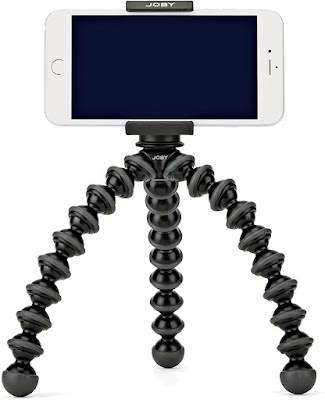
GripTight GorillaPod Stand PRO: Premium Clamping Mount and Tripod with Universal Smartphone Compatibility for iPhone, Google Pixel, Samsung Galaxy and More  >> See product details


This tripod is compact enough to throw in a backpack and quite stable even on uneven surfaces like rocky terrain or the beach. Perfect for taking time-lapses with my phone. It is compatible with most cases. This bendable, movable tripod is super helpful for taking photos and videos from cool and unique angles.

I found myself using it for facetime calls all the time too. Being able to move the tripod around to find the best angle really helps make you feel more at ease on a video chat. As good as it is for photography, I think having the ability to set up a video call from just about any angle on any surface makes this more useful than any other phone accessory I've ever gotten.  


2. Yoozon Selfie Stick Phone Tripod

The Best Tripod for iPhones and Android Smartphones
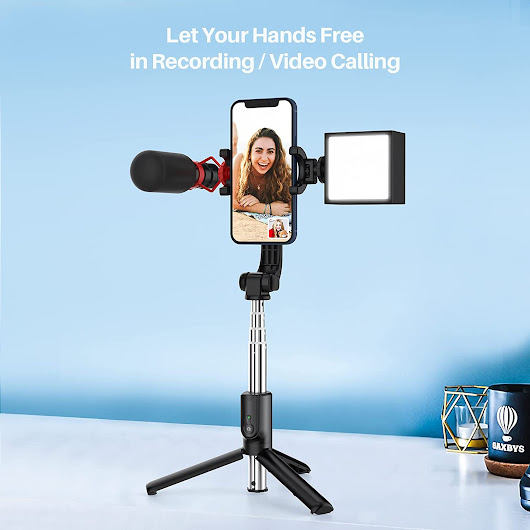
Yoozon Selfie Stick Phone Tripod: All in One Extendable & Portable iPhone Tripod Selfie Stick with Wireless Remote, Compatible with iPhone and Android Phone  >> See product details


The Yoozon Selfie Stick impressed us with its ability to quickly transform from a 2-foot-tall tripod to a selfie stick, with the bonus of a Bluetooth trigger button that slides out of the handle to become a remote. In its collapsed form, the Yoozon Selfie Stick is about the size of a banana, small enough to be at home in a purse or sticking out of a back pocket. 


The Best Tripod for iPhones and Android Smartphones
Yoozon Phone Tripod


Grabbing and pulling on its top extends it to just over 2 feet, which makes it possible to fit a group of people into a selfie picture. Three legs pop out from its handle if you choose to place the tripod on a table for an eye-level shot.


The Best Smart Phone Tripod
Yoozon Selfie Stick Phone Tripod


This is the best smart phone accessory ever. The selfie stick is built very well and is reliable. It is easy to use and is small and light so it's easy to bring anywhere. It's not for a heavy camera, the small tripod is just great for taking pictures on a table or counter. Another feature, it's not long like a fishing pole. The length is just long enough so you can hold it steady and the phone isn't bouncing around.

With a perfect balance of durable hardened plastic and solid aluminum the tripod feels like it should cost twice its value. The functionality is superb with a swivel device clamp that can shoot landscape and portrait, 4 tier extension that will stay at any height you decide to adjust it to. 

Bluetooth remote worked at a distance much greater than advertised, remote also slides seamlessly into the handle at the perfect location to snap selfie stick type photos, handle fans out into the tripod base which provides better than average stability on a flat surface. 

Well, that's the best tripod for smartphone according to my research. Thank you for reading.  


The Best microSD Cards in The USA and UK

MicroSD cards are flash memory cards. They are a version of SD (Secure Digital) cards which are extensively used in mobile phones, GPS, video games, audio players, USB flash memory devices and some other electronic devices. MicroSD cards are the smallest possible SD cards of all the SD cards available.

A microSD card measures 15mm x 11mm x 1mm and weighs only 0.5 grams. This is one fourth of the standard SD card size. It is this small size of the microSDcards that has allowed them to be used increasingly. The first microSDcard was introduced by SanDisk and became quite popular from then on. 

This card is ratified by the SD Card Association. Initially, the microSDcard was available up to 128 MB but now it ranges from 64 GB to 128 GB. This implies that microSDcard stores the same amount of data as the standard SD card but in a very tiny space.

Some of the modern devices like mobile phones, GPS and audio players have microSDcard slot and therefore these will not support the other SD cards. MicroSD cards have backward compatibility which is one of its best features. This means that even if the device does not specifically supports the microSDcard an adapter can be used to read or write data. 

Any device that has a SD or MMC slot can use the microSD card. All that is needed is an adapter that comes with the card. This indicates that the microSD card can be used on almost any device that supports the SD card. They can be easily and quickly inserted in any of the device.

Different microSD cards come with different storage capacities. The more the storage capacity, the more expensive the card will be. These cards come in three different speed classes. A speed class is the minimum read/write speed for the card. Sometimes the read and the write speed for the microSDcard can vary.

The prices of the SD cards have fallen dramatically and the same goes for microSDcard. The microSD cards are bit more expensive than the standard SD cards. The reason for this difference is well justified because of its compact size. Today, microSDcards are used increasingly as they are compatible with most of the electronic devices.


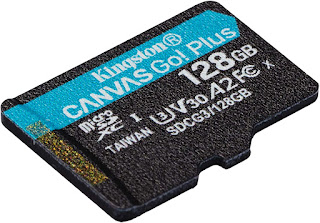
Most genuine, brand-name microSD cards are fine most of the time, and there won’t be a problem if you don’t want to overthink making your choice. But for about the same price, some cards are a bit faster or offer a tad more reliability, which can make them more versatile and a better long-term value. After evaluating over 15 microSD cards, I have found that the Kingston Canvas Go Plus and SanDisk MicroSDXC card for Nintendo Switch are the best microSD cards for the majority of phones, tablets, and, yes, Nintendo Switches.  


1. Kingston Canvas Go Plus


The Best microSD Cards
Kingston 128GB microSDXC Canvas Go Plus  |  170MB/s Read UHS-I, C10, U3, V30, A2/A1 Memory Card  >> See product details


This is the Fastest SDXC on the market, for the lowest price on the market. I bought a 128 GB SDXC Canvas React Plus for my Canon Vixia GX10 to record 4K video at 60p. Huge data rates, No errors! I record very large data files flawlessly. This microSD card is consistent, and reasonably priced, and good for phones, tablets, game consoles, and more. 


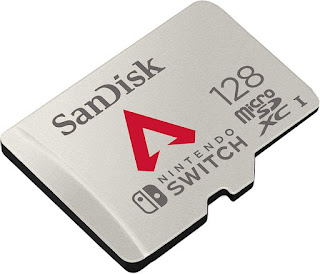
2. SanDisk MicroSDXC card


The Best microSD Cards in The USA and UK
SanDisk 128GB microSDXC Card Licensed for Nintendo Switch, Apex Legends Edition  >> See product details


SanDisk 128GB microSDXC Card
Avex Legend Edition SanDisk MicroSDXC card

This microSD card is fast, consistent, reasonably priced, and is good for phones, tablets, game consoles, and more. The card I tested is labeled with the Apex Legends game logo, though it will work with other games, too. 


The Kingston Canvas Go Plus and SanDisk MicroSDXC card for Nintendo Switch are the fastest cards I tested in this group of moderately priced microSDXC cards and are our picks for most people. Both cards are easy to find online and in traditional stores. 

Both will be quick enough for 1080p, 4K, and up to 5K video in action cameras and drones, plus the cards will add storage to smartphones, game systems, and tablets, and can function as the boot drive or storage for a kit PC like the Raspberry Pi. Pick whichever is on sale when you need one, or whichever is easier to get.

Well, that's the best microSD cards recommendation according to my research. Thank you for reading.


The Best USB C Charger For iPhone and Android in The USA & UK

If anyone bought any of the new iPhones this year you will of course notice a charger missing which for paying the price you do is scabby being polite. Their argument does not bode well either stating there is plenty out there lying around the house which is true but this comes with a lightning to USB-C cable so you will need a charger with a USB-C connection to get power to your device if you are not one to use wireless charging, you can of course go for their overpriced clumsy magsafe charger.

Apple claims the smaller box this time round and claims less package waste but still want to fleece you for their own charger that is a rip-off and 5W which still has to ship and adds to more waste so Apple I do not buy it the public does not buy it and nor will people buy your more expensive crappy charger when there is better on offer costing less and charging your device faster such as the Anker USB C 20W charger we have here today, and not only does this charge iPhone it charges all devices once you have compatible cables to match.


The Best USB Charger For iPhone and Android
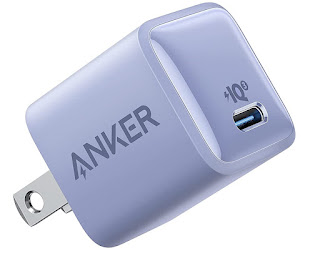
Anker USB C Charger 20W, 511 Charger (Nano), PIQ 3.0 Durable Compact Fast Charger, Anker Nano for iPhone 13/13 Mini/13 Pro/13 Pro Max/12, Samsung Galaxy, Google Pixel 4/3, iPad/iPad Mini  >> See product details


The Best USB Charger For iPhone and Android
Anker PowerPort III Nano


If you want the smallest power brick available that’ll charge your phone at the fastest speeds, we recommend the single-port Anker PowerPort III Nano. It’s the same size as Apple’s ubiquitous 5-watt charger (the one that Apple used to include in iPhone boxes), and it supplies up to 20 watts over USB-C. 

That’s enough power to charge most phones whether you have an iPhone, a Samsung Galaxy model, a Google Pixel handset, or some other Android phone with fast charging more than halfway full in just 30 minutes. This model also powers Apple’s MagSafe wireless charging system at its maximum 15 watts.

Anker USB C charger is an excellent product for portable wall charger that will fit in any bag or backpack. Although the downside of this product is that it doesn't fold in, which can get damage while traveling, but for a fairly cheap price, this charger is the best.

Over all this is a slight bit smaller than Apples offering chargers 3 times quicker and costs less so this is a win in anyone’s book from all angles and Anker is a well known solid established brand and you can be sure charging any phone will not be an issue or cause problems. 

This is a mid range charger you could say now as there is faster charging options out there today but charges your iPhone 3 times quicker so keep this in mind and for the iPhone 12 it takes about 1 hour and battery size of course will differ between devices.

Well, that's the best USB C phone charger recommendation according to my research. Thank you for reading. 


The Best iPhone Tempered Glass Screen Protectors in The USA and UK

It is sure, you have to guard the actual iPhone since its touchscreen display could be damaged fairly simply using the slightest provocation, it is best to protect its buttons from external elements, dust and dirt by iPhone screen protector. Not many people are aware of the significance of iPhone protector and they believe that it's not at all helpful or necessary to buy it. But really it is an inevitable part of iPhone. 

Often you keep your iPhone in the pocket or bag where you also keep your coins, keys and various other things so it may quickly get scratched and damaged and after it gets scratched then it doesn't give as nice and good look as before. Sometimes it may fall from your pocket or purse on the floor, and damage very badly. 

To help protect your iPhone from all of these damages you should use iPhone screen protector. As it is clear from its name itself, it protects your screen from getting damaged and makes it look like new always which provide you with very excellent and clear look. It protects your touch screen device from external damages.

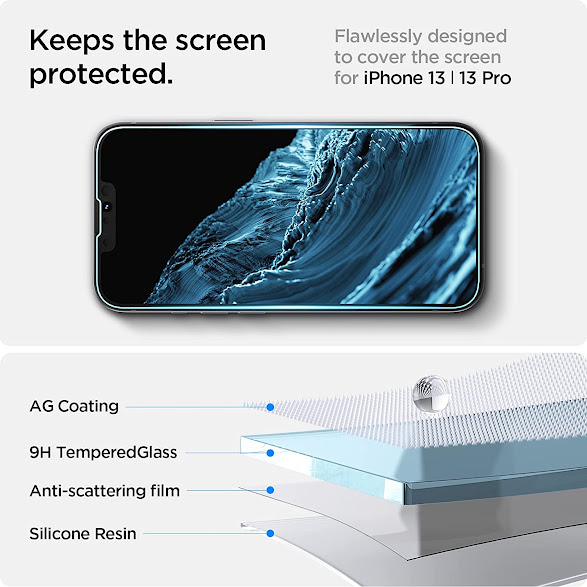
One such iPhone screen protector referred to as Spigen Tempered Glass Screen Protector is designed for iPhone. It keeps your iPhone pristine because it provides a perfect combined optical clarity and anti-glare and also provides maximum visibility even in daylight and other lighting conditions. Moreover, it protects it from finger print marks, scratches, dust and other harmful damages. It's made with superior quality of dual layered film. Its glueless adhesive does not leave any marks on it. It can be washed with lukewarm water to obtain its previous adhesive quality.


The Best iPhone Screen Protectors:


The Best iPhone Screen Protectors in the USA and UK
Spigen Glas.tR EZ Fit (Sensor Protection) Tempered Glass Screen Protector for iPhone 13 and 13 Pro


The Best iPhone Tempered Glass
The best screen protector for the iPhone: Spigen Glas.tR EZ Fit  >> See product details


Previously discussed are almost all the required features of iPhone screen protector but to learn more about it, you'll have to take practical experience of it. As you begin using it you'll automatically know why it is useful and a must for your iPhone. 

All of the necessary information associated with the product including image and price is also displayed on the website. So if you really like your iPhone and you want to use it for a long life then only iPhone screen protector can give a long life to it by simply keeping its excellent screen for always.

Spigen Tempered Glass Screen Protector is an iPhone screen protector unlike any other screen protector you have seen so far. Rather than a thin sheet of plastic to protect your iPhone's glass, it utilizes more glass. Spigen Tempered Glass Screen Protector made with chemically treated, clear tempered glass. The back of it is coated with a silicon adhesive making installation easier and if it is applied correctly, you won't have any spaces for dirt and will not affect the screen's sensitivity.

Applying a Spigen screen protector is foolproof because the plastic guide tray is designed so that it can’t be lined up incorrectly. The tempered glass meets our expectations for clarity and scratch resistance. The Spigen glass covers the iPhone’s front-facing cameras with no ill effects, leaving only the earpiece exposed. And for about the price of a movie ticket, you get two pieces of glass, so you can have a backup or share one.

I bought it to use with the 2 new iPhone 13 pro's that we bought. This was really easy to install. I have installed various screen protectors over the years, and this one was virtually dummy proof. Time will tell how well it holds up on the phone, but so far it fits perfectly. It is also one of the few I found that did not have a huge cut out at the top.

An iPhone Screen Protector is regarded as an absolute necessity for individuals who posses an iPhone to protect it from any scratch, or splits. iPhone Screen Protectors are fantastic investment to make your cell phones and other cool gadgets last much longer.

Well, that's the best iPhone tempered glass screen protectors recommendation according to my research. Thank you for reading.  


Also available for these iPhones:


The Best USB-C Power / Charger Cables in The USA and UK

Because USB-C Power Delivery allows for higher charging speeds, when you're using the best USB-C charger, you should trust your devices to only the best USB-C cables because when they break, they can fry your device or start a fire. 

Back in the early days, you had to be extra sure your cables were adequately made, but these days USB-C cables have reached a safe, stable standard (for the most part). So if you need a full USB-C to USB-C, there are great, safe USB-C cables to be had out there without spending an arm and a leg.

If you have a device with a USB-C port, such as a MacBook or other compatible laptop, an iPad Pro, a Nintendo Switch, or an Android phone, you need a cable to charge it and to transfer data to and from other devices. Unfortunately, when it comes to USB-C, even cables that look identical can behave very differently, for instance, a cable that charges your phone at top speed might be sluggish at transferring music files, or vice versa. I have tested dozens of cables and adapters to help you find the right ones for your needs without overspending.


The Best USB-C to C Cable
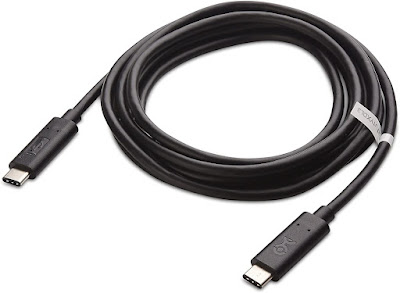
This 6.6-foot cable rated for 100 watts performs just as well as Apple’s MacBook Pro charging cable for about half the price.


Cable Matters USB C to USB C Charging Cable


USB-IF Certified Cable Matters USB C to USB C Charging Cable 6.6 ft (USB C Charge Cable, USB C Power Cable) with 100W Power Delivery  >> See product details


You may not be as familiar with Cable Matters, but the company’s is one of the most affordable options on this list of the fastest charging cables. If you need the premium charging speed, though, Cable Matters was also one of the first manufacturers to push a Thunderbolt 4 certified cable, complete with 100W charging. It measures 6.6-feet long, and you’re looking at up to 40Gbps data transfer speeds. Of course, you’ll pay dearly for this power, but sometimes it helps to have top speeds at your fingertips.

This is a great USB C cable with e marked chip allowing it to fast charge my Samsung Galaxy Note 20 phone, as well as to use it to charge my Chromebook. This is a legit cable and I will buy another one or two, now that I know it's the real deal.

Well, that's the best USB-C cables recommendation according to my research. Thank you for reading. Good luck.


The Best Magnetic Desktop Charging Stand in The USA and UK

My Favorite Magnetic Wireless Desktop Charging Stand


Wireless Charging Station Only for iPhone
Anker Wireless Charger, PowerWave Magnetic 2-in-1 Stand / Wireless Charging Station Only for iPhone


The Anker Wireless Charger Stand is a great accessory for your desk, offering fast charging and adjustable viewing angles at half the cost of comparable models.


The Best Magnetic Desktop Charging Stand
My Favorite Magnetic Desktop Charging Stand: Anker Wireless Charger  >> See product details


One of my favorite places to use a magnetic charger is on my desk. A stand positions my iPhone at an angle that makes it easy for me to see notifications, plus there’s the grab-and-go benefit of not having to physically unplug my phone when I pick it up.

Anker Wireless Charger is a pretty good magnetic wireless charging stand for iPhone and AirPod Pro. To decide if this is a good choice for you, you need to ask yourself what you want it to do. MagSafe as a charger is kind of a mixed bag. 

If you need two hands to disconnect the phone from the charger, what have you really gained vs a cable, which charges faster and more efficiently? For me, the biggest answer is space on my nightstand. I hate cables dangling around and needing to find the right one, and this charges my AirPods or a second phone as well. 

So for me, this has a purpose. But as a single charger for one phone, I’d argue a regular Anker wireless stand is better because it’s easier to get the phone on and off the charger. For a nice all in one device that can charge two things overnight, or possibly to watch video at a desk, this is good, but I don’t think it offers a lot over traditional Qi chargers and/or wired charging. All depends on what you want to get out of it.

Well, that's the best magnetic desktop charging stand recommendation according to my research. Thank you for reading. 


The Best Magnetic Wireless Power Bank For iPhone 13 & iPhone 12

A power bank can be defined as a mobile charger that can be pre-charged to be used to recharge laptops, tablets, and phones later. This handy gadget can help you charge gadgets without having to plug into the electric socket. It is an important gadget in cases where there are power issues or when one is traveling. Below I will give you a magnetic wireless power bank recommendation that I think is very good Anker 622 Magnetic Battery (MagGo).
 
 
The Best Magnetic Power Bank For iPhone
My Favorite Magnetic Power Bank: Anker 622 Magnetic Battery (MagGo)


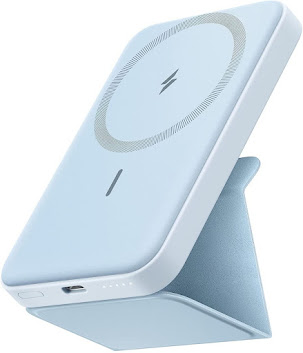
Anker’s magnetic power bank snaps onto the back of MagSafe-equipped iPhones and provides nearly a full charge at a fast-enough speed, while also working as a stand when you need one.


Anker Magnetic Wireless Portable Charger
Anker 622 Magnetic Battery (MagGo), 5000mAh Foldable Magnetic Wireless Portable Charger and USB-C for iPhone 13/12 Series  >> See product details


Although you can use any wired USB power bank to charge your iPhone, with MagSafe you don’t need a cable. Instead, you just slap a magnetic battery pack on the back of your phone and let it charge. The downside, however, is slower charging speeds compared with what you can get from a wired connection. 

But if you’re willing to sacrifice speed for convenience, I like Anker’s 622 Magnetic Battery (MagGo), our power-bank pick for people who have a MagSafe-compatible iPhone. The 5,000 mAh (19.25 Wh) power bank holds enough charge to fill the fully depleted battery of an iPhone 13 to about 83% nearly on a par with the results we’ve gotten from its closest competitors in this category.

Anker says its battery pack wirelessly charges at 7.5 watts, but in our tests the 622 brought the iPhone 13 to 14% in 30 minutes and to 27% in an hour, a speed comparable to that of other 5-watt magnetic power banks. And if you have a cable handy and need a quicker top-up, the Anker model’s USB-C port supports 12-watt wired charging.

In addition to solid charging performance, the Anker 622 has a built-in, origami-like foldable kickstand that props up your phone at a 30-degree angle without adding extra bulk. It also fits every MagSafe-compatible phone. I love this mobile MagSafe charger and it’s far better than the $99 one apple sells.  

Well, that's the best magnetic power bank according to my research. Thank you for reading. 


The Best iPhone 13 Cases for iPhone 13 Mini, Pro, Pro Max in The USA and UK

Selecting the best iPhone case varies as per your personal requirements. There are primarily 4 kinds of iPhone cases: plastic, leather, rubber and metal. Let us take a look at each of them.

If you want the highest security against accidental falls and crashes, a rubber (silicone iPhone protection case) is your best option. They offer an excellent grip too. But remember that rubber cases are likely to attract more dirt on the surface over time. So if you opt for a rubber case, get it cleaned regularly.

If you are a lover of elegance and quality, opt for a leather protector. They are sturdier than others. The only drawback is that they are costlier than the other kinds of iPhone cases. Few models put on bulk, while others don't. But be careful of imitation leather cases for iPhone and take to purchase only the authentic leather protection case.

Plastic cases can look very attractive in numerous types of colors and can be produced very thin. But be careful as they don't protect you much from falls and hits. They are normally the cheapest ones. Some people like changing their cases frequently and purchase a few of them at a time.

Lastly, there are very secure metal cases for iPhone. They are meant for people who are very active and can easily damage the instrument. These cases secure the device completely. Also they make the instrument very bulky. Normally, people do not prefer these bulky ones.


The Best iPhone 13 Case - Recommendation:


iPhone 13 Pro Max Clear Phone Case Compatible with MagSafe
iPhone 13 Pro Max Clear Phone Case Compatible with MagSafe  >> See product details 


Case Black Ops for iPhone 13 Pro
Element Case Black Ops for iPhone 13 Pro  >> See product details 


Case for iPhone 13
OTTERBOX DEFENDER SERIES XT SCREENLESS EDITION  (Case for iPhone 13)  >> See product details 


Case for iPhone 13 Mini & iPhone 12 Mini
OTTERBOX SYMMETRY SERIES  (Case for iPhone 13 Mini & iPhone 12 Mini) >> See product details


These are my favorite cases by far. I have used them for my last three phones. Perfect combination of protection, grip, slim profile, and good looks. Feels good in your hand. Doesn’t “stick” in your pocket like some soft silicone cases do. Very thoughtfully designed. Try it, you will like it.

Well, that's the best iPhone 13 case recommendation according to my research. Thank you for reading. Good luck!


iPhone 13 Honest Review: Slightly Improved But More Perfect

The number 13 may give a negative impression to some people, but Apple doesn't seem to care about keeping the name iPhone 13 for their latest iPhone. The iPhone 13 is more or less similar to its predecessor the iPhone 12. If you're looking for a significant update, you might be disappointed. 

Even though unlike its older Pro and Pro Max series, which now support a 120Hz refresh rate, the iPhone 13 still brings updates, especially a longer battery life, a new powerful chipset, and a more sophisticated camera.

In this review I used the blue color variant which looks light blue and pleasing to the eye. On the back of the cellphone using a glossy finish while on the sides it uses a matte finish which looks more attractive.


iPhone 13 Blue
iPhone 13


On the sides of the iPhone 13 there are standard buttons such as volume control, silence control, and side buttons and there is also a SIM card slot and Lightning connector. The iPhone 13 is still comfortable to hold in one hand thanks to its not too big size and a weight of only 173 grams. However, the box side slightly reduces my comfort when used for a long time. My solution to this was to use an extra case.

iPhone 13 uses a 6.1″ Super Retina XDR OLED display with a general brightness level of 800 nits and a maximum of 1,200 nits which makes this screen able to display colors sharply and brightly in various situations. The iPhone 13 screen feels satisfying when used for watching movies and plus there are loud stereo speakers in it.

It's a shame Apple didn't bring 120Hz refresh rate technology to the iPhone 13. This high refresh rate is only for the Pro and Pro Max series. It's a bit disappointing to see that the 120Hz refresh rate has become the standard for today's flagships.

The bangs on the iPhone 13 screen are now slightly smaller than the previous generation. Apple seems to still stick with its stance in using bangs for the placement of the front camera and Face ID. 


iPhone 13
iPhone 13  >> See product details


But during a pandemic like now where I often use masks, Face ID is often a hassle because it can't detect my face when I use a mask. If it's only for unlocking the cellphone, I still have no problem entering the PIN manually. However, for certain applications that have been set to use Face ID, I need to enter a username and password which is more inconvenient.

The iPhone 13 uses the latest A15 Bionic chipset. Its performance is undoubtedly fast for various purposes. I haven't had any problems in terms of performance so far. Although the iPhone 13 does not support a 120Hz refresh rate, the animations displayed when operating this phone still feel smooth.

For those who like to play games, the iPhone 13 is capable of crushing popular games such as Mobile Legends and PUBG Mobile at high graphics settings. 

One thing that is interesting about the iPhone 13 is that now the lowest internal storage capacity is 128 GB, not 64 GB anymore. And this is at the same price as the iPhone 12 with a 64GB capacity. This increase should be appreciated because 64GB of storage nowadays is already too small considering that today's applications can reach more than 1 gigabyte in size and multimedia content is increasingly widespread.

You might think that what's new with the iPhone 13 camera is that its position is now diagonal, but the iPhone 13 seems to use the same main camera as the iPhone 12 Pro Max which is actually more sophisticated.

This is also what causes the iPhone 13 camera to be bigger and inevitably has to be positioned diagonally to keep it fit on the protrusion of the camera. Unfortunately, the number of rear cameras provided is still two, namely a wide camera and an ultra wide camera which both have a 12MP sensor.


iPhone 13 Review
iPhone 13 camera shots 


As expected, the photos are satisfying in a variety of situations. The colors are sharp and accurate and the photos appear slightly brighter than the original. The ultra wide camera is capable of capturing images with a 120° viewing angle. The results are still ok, although not as good as the main camera. Unfortunately, in some of the photos I took, the sky was too bright, so it obscured the blue sky.

The main camera of the iPhone 13 can also take good photos of my face. The details of my face are well recorded and the skin tone is similar to the original. Using Portrait mode can also produce neat bokeh photos. In low light conditions, the iPhone 13 camera can still produce satisfying photos. At night the camera will automatically activate Night mode and this can be set to take longer to shoot photos to produce even better night photos.

For the front camera, the iPhone 13 uses a 12MP lens with an /2.2 aperture. The details of the surface of my face in the selfie photos are captured well. The photos look bright with accurate and natural colors. Both the rear camera and front camera of the iPhone 13 are capable of recording video at 4K resolution and a frame rate of 60FPS. The video recording looks sharp and stable even though I record it while moving.

Even in dark conditions, the iPhone 13 camera is still able to produce videos with good quality. It is worth applauding the performance of the iPhone 13 in this video recording sector.

In the battery sector, the iPhone 13 provides a battery with a larger capacity than the iPhone 12. In my daily life, the iPhone 13 can last more than one day of use, so I don't have to bother charging my cellphone before the day is over.

I can usually get an average screen on time of around 5 hours from 100% to 20% battery for my daily use like browsing, social networking and using work apps. For battery charging, the iPhone 13 supports fast charging with a 20W adapter and up to 15W wirelessly with MagSafe.

The iPhone 13 does not provide a default charger in the sales box, so you need to use an existing charger or buy a new one. I tested the battery charging using a UGREEN charger, it took about 45 minutes to charge the battery from 10% to 80% and 1 hour 33 minutes to charge up to 100%.

For longer battery life, iPhone 13 provides an Optimized Battery Charging feature so that the cellphone waits before charging the battery more than 80%. The negative effect is that this feature will of course make full charging slower.

Overall, the iPhone 13 is a good phone, although the price is relatively expensive and does not support high refresh rates, but battery is better, the camera is more sophisticated, and the performance is faster.  The design of the iPhone 13 with square sides may be pleasing to the eye but less comfortable to grip.  


Summary

Overall the iPhone 13 is a good phone even though the price is relatively expensive. However, if you already have an iPhone 12 and want to upgrade to an iPhone 13, maybe the iPhone 13 doesn't feel like an improvement.

Pros:
  • Satisfactory camera
  • Long battery life
  • Powerful performance
  • Quality screen
  • Larger internal storage capacity

Cons:
  • Doesn't support high refresh rate yet
  • Not comfortable to hold
  • Not included charger


Well, thank you for reading. Good luck.


The Best Android Phones in The USA and UK

Android is the most popular operating system for mobile phones nowadays and there are lots of new device releases each month. With Android covering more than 40% of the market shares, it is clear that Google's OS runs on the best smartphones out there. Although in fierce competition with the iPhone, the phone manufacturers working with Android do a fantastic job and even if it is difficult to name the best Android device, it is clear some of them stand out. Google Pixel and Samsung Galaxy S are definitely the best Android phone out there.
 
1. Google Pixel 6 Pro - Short Review
The Best Android Phones
Stormy Black Google Pixel 6 Pro  >> See product details


The Pixel 6 Pro takes the amazing Pixel 6 and adds a bigger, better screen and a zoom camera. We see from the aspect of the Google Pixel 6 Pro, which until now is still priced at around $900 and is finally equipped with Google's own Tensor chip. The Pixels 6 Pro feature is indeed quite interesting because it is equipped with 12GB LPDDR5 RAM which can be calculated to support user multitasking activities.

In addition, the Google Pixel 6 Pro is equipped with 256GB or 512GB UFS 2.1 access as a more spacious file storage area. The Android 12 operating system is the mainstay of this smart phone and there is the latest Android version with a period of three years to 5 years of security updates on this smartphone.

This smart phone made by Google is also equipped with a 6.7-inch curved LED LTPO screen that presents a standard high resolution of 3120 x 1440 pixels to be able to create a refresh rate of 120Hz. The panel shape of the screen is also equipped with Gorilla Glass Victus technology which provides a punch hole in the middle for the camera.

Not only does it offer some calculations from RAM and chipset, but the camera on this phone gives the best option in the front sector with an 11.1MP resolution and three rear cameras in the form of a 50MP primary camera and 48MP telephoto and 12MP ultrawide.

Indirectly, the camera feature of the Google Pixel 6 Pro provides additional features such as Face Unblur, Motion Mode, Real Tone, Magic Eraser, and makes it easy for users to delete background objects in one photo.

The battery capacity provided by Google on this smartphone is fairly high, which is supported by a 30watt wired and 23watt wireless power system. There are three color variants including Sorta Sunny, Stormy Black, to Cloudy White.


2. Google Pixel 6  - Short Review


The Best Android Phones in The USA and UK
Kinda Coral Google Pixel 6  >> See product details


The Pixel 6 offers the best version of Android, with guaranteed updates through fall 2026, plus the best Android camera we’ve ever tested, a custom Google processor, and excellent build quality for half as much as Samsung’s Galaxy S21 Ultra.

Google Pixel 6 version which should be able to provide the best concept for a sophisticated phone which is priced at around $700. The Google Pixel 6 is also equipped with up to 8GB of RAM, there are two ROM options, namely 128GB and 256GB. The battery capacity of the Google Pixle 6 version is slightly below the capacity of the Pro version, reaching 4612mAh.

In addition, this one phone is also equipped with a Full HD OLED screen with a resolution of 2400 x 1080 pixels with a size of 6.4 inches with a refresh rate of up to 90Hz.

In terms of the operating system, this smart phone also uses Android 12 which then gives faster multitasking access speeds. Not infrequently the performance of this new phone is also said to be more effective for browsing activities or processing all documents.

The camera feature of the Pixel 6 itself provides two rear camera options, two 50MP resolution lenses for the primary, while 12MP for the ultrawide. The 114-degree Field of View feature on this new phone is also said to be quite effective for creating the best images and the front camera is also equipped with an 8MP resolution camera.

The color variant on the Google Pixel 6 is also available in 3 color variants ranging from Kinda Coral, Softwa Seafoam, dan Stormy Black.


Google Pixel 6 and 6 Pro
Google Pixel 6 Pro and Google Pixel 6


3. Samsung Galaxy S21 Ultra 5G


Samsung Galaxy S
Ssamsung Galaxy S21 Ultra 5G  >> See product details


When compared to the other two series (Galaxy S21 & Galaxy S21+), the Galaxy S21 Ultra has superior specifications, such as a larger screen, higher brightness, the highest screen resolution, the most camera configurations, and many other factors.

There are several variants of the Galaxy S21 Ultra offered by Samsung. The first model is 12GB RAM / 128GB ROM, the second model has 12GB RAM / 256GB ROM, and the last model is 16GB RAM / 512GB ROM. For the record, the entire Galaxy S21 series is not equipped with a microSD slot. And like the previous Galaxy series, the Indonesian market gets the Galaxy S21 Ultra with Samsung's own Exynos 2100 processor. Here are the results of my review.

Design

The screen size of the S21 Ultra is the largest when compared to other Galaxy S21 series, which is 6.8 inches. For information, the Galaxy S21 and Galaxy S21+ have a size of 6.7 inches and 6.2 inches, respectively. Talking about the screen, it is not surprising that the S21 Ultra comes with a 2X AMOLED panel technology that has a refresh rate of up to 120 Hz.

In order to save battery, the refresh rate can vary according to the content being displayed. To enable this feature simply go to Settings > Display > Motion smoothness. Then, select the Adaptive option. This option offers an automatic refresh rate from 10 Hz to 120 Hz. The screen resolution that the S21 Ultra brings is WQHD + or 3200 x 1440 pixels.

The left and right sides of the phone's screen are curved, but not as significant as in the early days of Samsung implementing a curved side screen on the previous Galaxy S series. At the top of the screen there is a notch with the Infinity-O design for the front camera.

The mobile screen with dimensions of 165.1 x 75.6 x 8.9 mm has a layer of Gorilla Glass Victus, which is the strongest screen protection system currently from Corning. Turning to the back, the S21 Ultra body feels very elegant when held. When exposed to light, the S21 Ultra is Phantom Silver in color as if it displays rainbow colors. But unfortunately, the phone body which weighs 227 grams tends to feel slippery in the hand.  

On the right side are the power button and volume button. By default, the power button will take us to access the Bixby digital assistant when pressing it for a long time. But you can change it to access power by going to Settings > Advanced features > Side key. After that, you just select the 'Power off menu' option. In addition, this button can also be a shortcut to access the camera when pressed 2 times.

Samsung designed the body of the S21 Ultra with IP68 certification. This means that this phone is water resistant to a depth of 1.5 meters for 30 minutes. On the bottom side, there is a tray for a SIM card, a USB-C port, a microphone hole, and a speaker. There is no socket to attach the 3.5mm earphone jack. The entire frame of this phone is made of aluminum.

Good Camera

On the rear camera module, the S21 Ultra has 4 cameras, consisting of a main camera with a resolution of 108 MP, an ultra-wide camera with a resolution of 12 MP, a telephoto camera (3x zoom) with a resolution of 10 MP, and finally a periscope lens camera (zoom 10x) with a resolution of 10 MP. While on the front, there is 1 camera with a resolution of 40 MP.

The main camera of this phone has a focal length of 24 mm (35 mm equivalent), so that includes wide coverage. The resulting color is very good. However, the brightness is maintained so that it doesn't become over-saturated. However, there are parts that still look dark on the leaves that I photographed on the right. However, the overall performance of Auto Exposure looks very good because it displays an optimal portion of the highlights and shadows. In addition, the texture on the leaves in the distance is still clearly visible.

Well, that's the best android phone recommendation according to my research. Thank you for reading. 


The Best Portable Chargers and Power Banks for Phones and Tablets

There are a lot of viable options in the market when looking for the perfect portable charger/power bank. However, with such a wide range of options to choose from, it becomes a hectic task to choose the best portable charger/power bank for you.

One of the most important qualities that you must look for in your best power bank charger is the charging capacity. More often than not, the people who use portable power banks use them as they are traveling a lot. So having a power bank that has more mAh will be helpful as your smartphone will be able to get more full charges when you aren’t around a power socket or a mobile charger.

Another important feature that you shouldn’t neglect is the size and sleekness of the portable power bank. The power bank should be handy and easy to carry around because you would want your power bank to be an asset and not a burden that you have trouble carrying around.

With this best selling product, you will never have to worry when your smartphone’s battery dies. And you will not have to look for a power socket or a mobile charger to charge your phone, you can just do that with a power bank.


The Best Portable Chargers and Power Bank
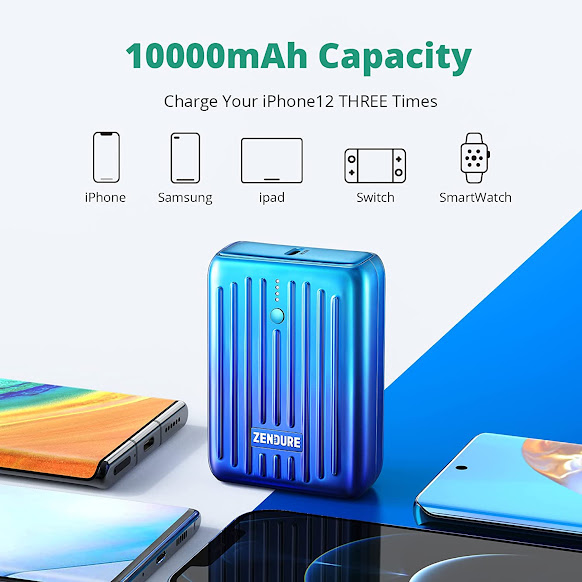
Zendure Power Bank 10000mAh Mini Portable Charger  |  External Battery for iPhone, Tablet, Switch and More  >> See product details

The Zendure SuperMini 20W is the total package when it comes to charging a smartphone or other small electronic device while on the go. It’s compact and lightweight, around the size of a deck of cards and as heavy as an iPhone 13, yet its capacity rating is as high as any of our other picks. 

The Zendure has a port on each end: a USB-C PD port on one side that works for both output and input (meaning it’s how you recharge the power bank itself), and a standard output-only USB-A port on the other. In our tests, I measured a maximum output of 18.6 watts and a maximum input of 19.3 watts from the USB-C port, and a maximum output of 16.6 watts from the USB-A port. 

While those numbers fall a little short of its 20 W output rating, the SuperMini is still powerful enough to charge most devices at top speed from either port, or to charge two devices simultaneously at slightly slower speeds. With a capacity rating of 10,000 mAh, you can fully charge your phone up to three times (or make instant friends by topping off strangers’ phones, as well the “bumming a cigarette” of the digital age).

The exterior of the Zendure is a hard, shiny, plastic shell that’s relatively resistant to scuffs and scratches. It comes in a variety of colors (red, green, black, silver, blue, and pink) and, measuring just 3.1 by 2.2 by 1 inches, fits in the palm of your hand. It weighs 6.4 ounces—about as much as a hockey puck, which is lighter than any other 10,000 mAh power bank I tested.

If you want a power bank that you can easily slip into a pocket or purse as you walk out the door but that still contains enough juice to charge most smartphones up to three times, this is the one to get.


Zendure Power Bank
Zendure Power Bank 10000mAh Mini Portable Charger  >> See product details


Lovely blue color, bought as a gift for my friend who so far only used it once since Christmas. He said it was bigger then he thought it would be but does fit in his Jean's pocket so that's a bonus. This portable battery is mini and doesn't take too much space to fit in your bag. It is light and won't add any weight to your bag as well. The dual output for USB-C and that I can charge my iPad and my phone without using a real charger and I don't need to find a wall-outlet as well.


Also great: Anker PowerCore III Fusion 5K


The Best Portable Chargers and Power Bank
Anker PowerCore III Fusion 5K  >> See product details 


This is a great product, it's really easy to use. All of their claims are accurate and true, the fast charge is amazing. The Anker PowerCore III Fusion 5K is handy if you want a single, reliable charger that you can plug in the wall to charge your devices overnight and then pack up and carry with you during the day. Its 5,000 mAh capacity is half that of the Zendure models, but that’s still enough to fully charge most smartphones more than once (and at 6.4 ounces, it’s just as lightweight as our top pick). 

The Fusion 5K recharges quickly via its USB-C PD port or fold-out AC plug, most models I tested have just one or the other and it offers fairly fast charging for two devices at a time on the USB-C PD and USB-A ports. If you want a power bank that doubles as a wall charger, this is the best option I have found.

Well, that's the best power bank / portable charger recommendation according to my research. Thank you for reading.


Share with your followers: