Showing posts with label Audio Video Accessories. Show all posts

The Best USB-C to VGA Cable in The US and UK

VGA Cables are extension cables which transmit video signals between PC's or laptops and displays or projectors. They are also referred to as VGA extension, Computer Cable, Monitor cable, and VGA video cable. These cables extend the amount of distance you can separate a PC from a display, and typically can allow users to view the display up to 100 feet away from the computer. 

With changes in technology, DVI cables are slowly replacing the VGA cable. However the older versions of graphics cards still use the 15 pins VGA interface to connect the video graphics controller and monitor. These cables are also priced much cheaper than those which can also transmit digital signals and are used in networking applications. VGA cables are great to use in existing applications as a cost effective solution over replacing older configurations with digital technology in order to extend the life of your projects.


The Best USB-C to VGA Cable

After trying several USB-C to DisplayPort adapter, I feel that Plugable USB C to VGA Cable is the best compared to similar products. This cable connects to VGA monitors and projectors at up to 1920×1080 at 60 Hz. 


Plugable USB C to VGA Cable:


The Best USB-C to VGA Cable
Plugable USB C to VGA Cable  >> See product details


The Plugable USB-C to VGA adapter cable enables older VGA displays to be connected to a computer via a USB-C port or Thunderbolt 3 port which supports “VESA DisplayPort Alternate Mode over USB-C" ("Alt Mode"). DisplayPort signaling is converted to VGA by a chip in the adapter cable. 6 foot/1.8m cable is a seamless, single-cable solution for connecting from your Thunderbolt 3 or USB-C system to your VGA display, allowing for tidy installation and cable management without the need for additional dongles and VGA extension cables. Supports resolutions up to 1920x1080 (1080p) at 60Hz on VGA-equipped monitors, TVs or projectors.

Supported on Windows, macOS, Chrome OS, and Linux, as long as the computer has a USB-C port which supports video. Plug and Play, no software installation required.


The Best USB-C to VGA Cable in The US and UK


Plugable USB-C to VGA cable allows you to connect an external monitor or a video projector in VGA from a computer (Mac or PC) which for the most part no longer has one. It has a practical side as it does not require an external box like many. Also ideal for those who want to project content for nomads who do not have a VGA port on their PC, or have a second VGA output for a 2nd screen.

We can connect equipment up to 1920 x 1200 @ 60Hz, which is not bad. Attention, it will be necessary on the source that the computer can emulate the video on the USB-C port and be compatible Alternate Mode DP (Display Port), this adapter will convert DP to VGA. Often to ensure this compatibility, one sees a "DP" or "D" displayed next to the USB-C port.

This cable worked perfectly on my laptop and smartphone. I am able to use as a dual monitor which is great. For the rest it is perfectly functional, extra flat and well built in metal and solid, no driver to install, the connected monitor is detected as an additional screen on which to switch, a classic without difficulty. A practical and very useful product for a low price.

Well, that's the best USB-C to VGA cable according to my research and opinion. Thank you for reading, I hope it's useful.


The best USB-C to DVI Cable and Adapter in The US and UK

First off DVI stands for Digital Visual Interface which supplies a high resolution/speed visual quality on your digital displays. When using the DVI cables you want to ensure that not only do you have the right type of cable, you have to make sure the socket is the right one instead because if you force the cable in, you might break one of the pins. Also you want to know exactly what you're using the DVI cable for, like which devices are you planning on connecting together and what are the possible ways of doing so.

When it comes to DVI cable you don't have to really stress over about the price on it because they are inexpensive. Mainly all digital devices already come with some type of port or socket and if they don't support the DVI cables than they have converters which cost a little more but there's always something available. I normally go online and search for what's out there and just compare and contrast what's the best as far as pricing and what are the possible two devices that I can connect together.

Many modern laptops use small, versatile USB-C ports to connect to everything from chargers to monitors to hard drives, but most monitors, TVs, and projectors still have only older, more common ports like DVI. I have found the best USB-C to DVI cable and adapter to help you use your new computer with the video display you prefer. 


The best USB-C to DVI Cable and USB-C to DVI Adapter


After trying several USB-C to DVI cable and adapter, I feel that Cable Matters USB C to DVI Cable and Adapter is the best compared to similar products.  


1. Cable Matters USB C to DVI Cable


The best USB-C to DVI Cable and Adapter
Cable Matters USB C to DVI Cable  >> See product details


The Cable Matters USB C to DVI Cable supports the newest release thin notebooks and smartphones with USB-C or Thunderbolt 3 to an HD display with DVI.


The best USB-C to DVI Cable in The US and UK
This cable supports up to 1920×1200 at 60 Hz, and there’s no need to buy a separate DVI cable.


This is a great cable at a great price, this cable is clearly a cut above most cables in quality. This is the fifth USB-C DVI cable that I have purchased. This cable has solid hard plastic at the USB-C connection, the hard plastic appears to prevent breaking the internal physical connection from the wire to the connector if it flexes whenever you move it. Great way to use an older DVI monitor with with my newer Mac with only Thunderbolt/USB-C ports. Plug and play, the display was recognized immediately and showed a perfect picture.  


2. Cable Matters USB C to DVI Adapter
The best USB-C to DVI Adapter in The US and UK
 Cable Matters USB C to DVI Adapter  >> See product details


This convenient single-link DVI adapter supports resolutions up to 1920×1200 at 60 Hz. This lightweight adapter weighs less than 1 ounce to travel easily in a laptop sleeve.


The best USB-C to DVI Adapter in The US and UK


The Cable Matters USB Type-C to DVI Adapter is specifically designed to connect newly released thin computers to existing monitors with DVI. Connect your computer to a monitor for an expanded workspace with this portable adapter and a DVI cable. 


This is a great adapter to plug my monitor into my laptop without the docking station. This allows me to extend my laptop screen onto an external monitor. This DVI to USB-C adapter fixed my issues with dual monitors and now I can run both without any issues. Much cheaper than having to buy a new monitor because of an outdated connection. I also like that it uses Type C to plug into the laptop because I often have go use the HDMI port for other equipment. Durable and affordable.

Well, that's the best USB-C to DVI cable and adapter according to my research and opinion. Thank you for reading, I hope it's useful.


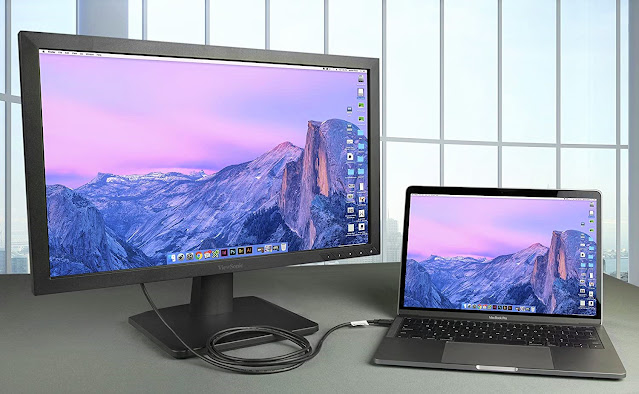
The Best USB C to DisplayPort Adapter in The US and UK

DisplayPort is an audio-video interconnect standard that is designed to advance display simplicity and the adoption of protected digital outputs on computers. This allows users to easily view HD content and other protected files. Because DisplayPort signaling can transmit both DVI and HDMI signals (other digital display protocols), DisplayPort is compatible with many popular interconnects and subsequently, the consumer devices that use the standards. For consumers, this means they can easily incorporate DisplayPort sources or devices in their homes and offices.


The Best USB C to DisplayPort Adapter - Recommendation


After trying several USB-C to DisplayPort adapter, I feel that Cable Matters USB C to DisplayPort 1.4 Adapter is the best compared to similar products. This simple adapter can drive 60 Hz 4K screens with both PCs and Macs. Cable Matters promises that it supports 8K monitors as well.
The Best USB C to DisplayPort Adapter in The US and UK
Cable Matters USB-C to DisplayPort 1.4 Adapter


The Cable Matters USB-C to DisplayPort 1.4 Adapter connects a thin laptop with a USB-C or Thunderbolt 3 port to a monitor with DisplayPort. View video on a UHD monitor for an extended workspace, stream video to a UHD TV, or connect to a projector for a presentation. Supports video resolutions up to 7680x4320 with backward compatibility to 4K and below.


The Best USB C to DisplayPort Adapter
Cable Matters USB C to DisplayPort Adapter  >> See product details


If you have any kind of VR (Virtual Reality) headset and you need a DisplayPort input to plug into your PC or laptop except you don't have one, DisplayPort to USB C port (or DisplayPort to thunderbolt) will work excellent also. I purchased this item and it worked wonders for me, I was checking out Google Earth VR and let me tell you how amazing and breathtaking it is. Every place you want to visit in person at your fingertips. Picture quality is smooth with no issues, no screen lag, glitches or anything weird. 

This product is very durable and easy to use USB-C to DisplayPort adapter, I just plugged the USB-C end into the USB-C port on my Dell laptop and plugged my DisplayPort cable into it and into my Dell 2560x1440 dpi display. The materials of the adapter feel sturdy, but fairly standard, it's in a plastic housing, but the USB-C tip and DisplayPort adapter pieces are sturdy. Highly recommended.

Well, that's the best USB-C to DisplayPort adapter according to my research and opinion. Thank you for reading, I hope it's useful.


The Best USB C to DisplayPort Cable in The US and UK

Displayport is one of the newer video digital interfaces that serve as a cathode ray tube, or CRT for monitors and televisions. Displayport is one of the Video Electronics Standards Association's (VESA) newest vision in simplifying and standardizing video connections, including the common and much used VGA, DVI and HDMI interfaces.

The maximum capacity in transfer for a Displayport interface is around tens gigabits per second over a 2m cable. The Displayport connector acts as a direct competitor with the HDMI, featuring richer colors, higher resolutions and being able to hold a variety of different channels which handle device control instructions.

This particular cable has been in the markets since 2008. While the original VGA port has been extremely reliable and compliant, the Displayport cable sets a new standard which is on par with the HDMI. Possible uses for the Displayport cable range from a home entertainment system to a computer monitor. The Displayport connection allows for a direct connection from the computer onto a digital entertainment system, greatly simplifying the process and cutting out any messy wires.

Utilising a USB connection supporting 1 of 4 pairs of data including audio, video, and clock signals, the Displayport cable boasts a maximum resolution of 1080p. Although the Displayport cable itself is compliant with other HD systems such as DVI and HDMI, the Displayport connector itself is not cross compatible.

Security measures implemented into the cable includes DPCP, or otherwise known as DisplayPort Content Protection. DPCP allows for users to optionally enable content protection that can help protect transmission data from being intercepted and sent to unauthorized users from a distance. The Displayport system is also being constantly upgraded, with its development backed up by Intel is releasing new versions to the market much like the way HDMI does so.

And in comparison, when looking at Displayport and HDMI, which one is better than the other? There are a variety of answers to this, but one advantage of using Displayport is that it is currently license free, meaning that developers and computer technology manufacturers are more likely to use the Displayport connector since it is more cost effective than the HDMI which requires licensing fees. In terms of quality, the Displayport would be more or less on the same level as a HDMI, which is by far one of the best means of display HD media. Displayport has received much positive feedback from the market, and it will probably continue to do so.


The Best USB C to DisplayPort Cable - Recommendation

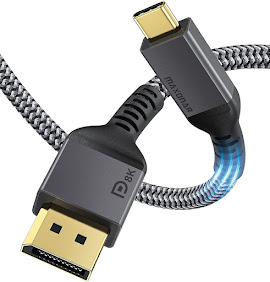
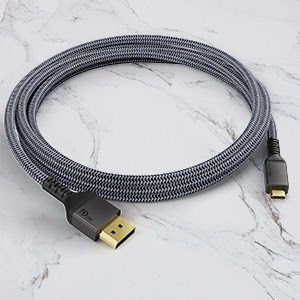
After doing tests on some USB-C to DisplayPort cables, I found that Maxonar DP cable have good quality materials and prices are quite affordable.

Maxonar USB-C to DisplayPort Cable:


The Best USB C to DisplayPort Cable in The US and UK
Maxonar USB-C to DisplayPort Cable


High-quality nylon braided jacket, The slim and lighter zinc alloy one-piece shell has better gloss and corrosion resistance. Compared with other shells, it is more rigid and reliable. 24K gold-plated interface, faster conduction, more stable signal, and will not fade.


The Best USB C to DisplayPort Cable
Maxonar USB-C to DisplayPort Cable


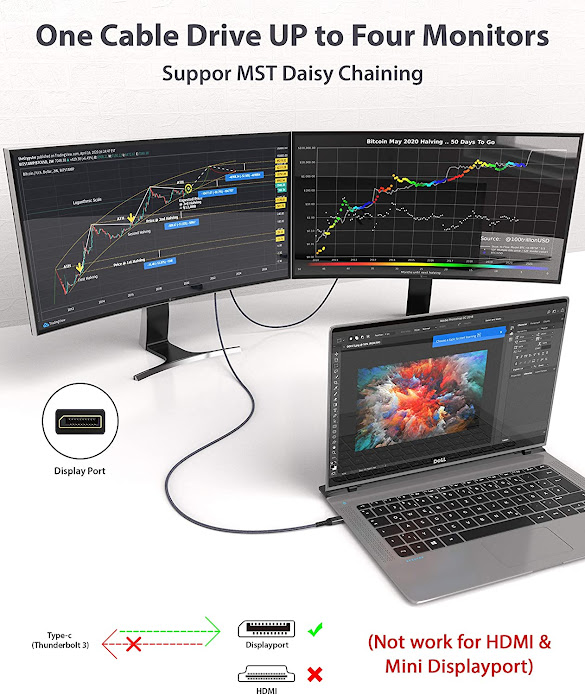
Maxonar enhance work productivity with the next-generation display interface. Drive Four DisplayPort monitors/displays/projectors at up to 8K@60Hz resolution with full audio support. Support for a multi-monitor configuration with displays equipped. MST Daisy Chaining for USB-C PCs, supports Samsung Dex. Meets all your needs from daily office use to professional video & photo editing. No connection direction, You can choose any end to connect your input or display. 

This cable supports the newest computers with Thunderbolt 3 (Type-c) ports; widely compatible with New M1 chip, Macbook Pro, Dell XPS, iMac, Surface Book 2, Pixelbook, Pixel Slate, Lenovo Yoga 920 and other computers and cellphone which supports DisplayPort Alternate Mode. Great for school, home or office work. 


The Best USB C to DisplayPort MacBook
Maxonar USB-C to DisplayPort Cable


This is an excellent and affordable cables, currently using a Surface Book 3 and Laptop 3 (work and personal), Surface Dock 2, and 2x Dell 4K displays for productivity. These cables are high quality and feel substantial, also lined with Nylon to give them that extra premium feel. The biggest benefit of these cables is the ability to shoot 4K @ 60hz (rather than the 30hz refresh you might get with other cheaper cables) providing a much more smooth/UHD experience. 

Well, that's the best USB C to DisplayPort Cable according to my research and opinion. Thank you for reading, I hope it's useful.


The Best USB C to HDMI Adapter in The US and UK

USB-C to HDMI port adapters allow you to connect your laptop or other device with USB C outputs to an external display with an HDMI input, like a monitor, video projector, or television with HDMI ports. A USB-C to HDMI adapter can turn your smartphone into an enjoyable home theater PC. 

There are just so many things that you can do when you get a good adapter including enjoying HD digital content straight from your smart device or smartphone to your HD TV. Below is a list of what you stand to enjoy after purchasing a good adapter.

1. Video Streaming

With a USB-C to HDMI adapter you gain access to your favorite video sources and can also stream through your preferred content. You actually can enjoy the same high quality resolution when streaming on the phone. Digital audio is also supported by the adapter and you therefore are able to surround the sound through the TV speakers or your home theater system for a pleasant video watching experience.

2. Big Screen Gaming

If you are a gaming enthusiast, then you can count on the adapter to give you an experience to enjoy. You have the chance to take your android gaming experience to the big TV screen with this device. Even with the big screen display, game control is still made easy from your phone's display or you can hook a Bluetooth mouse to make it even more enjoyable.

3. Web Browsing

Full screen web browsing will be made possible by the adapter. To enjoy a full screen internet experience you can use a Bluetooth keyboard. You no longer have to put up with displays that strain the eye if you have a smaller screen because the adapter makes your experience so much more comfortable.

4. Photo Displays

Do you have friends over and you want to show off some of your best shots from your phone? Or do you simply feel a need to enjoy those photos you have been taking all day with your device? Well a USB-C to HDMI adapter will make the display excellent and detailed. The adapter will allow you to display them on HD-TV in their original resolution quality. When you have a good quality adapter you will have no blur or pixel loss when displaying on the big screen.

Evidently there is a lot that you can enjoy when you have an adapter. However to get the most out of it, you must ensure that you buy a high quality adapter and from trusted dealers of suppliers for that matter. Some of the things that you should consider when buying your adapter are size, color, type of phones it is compatible with, resolutions it supports and other operating requirements you might need. With all these aspects in focus, you will be able to choose an adapter that serves all your needs.


The Best USB-C to HDMI Adapter - Recommendation:


Anker USB C to HDMI Adapter


Anker USB C to HDMI Adapter


Plug in and start using, no installation necessary. Connect your USB-C device to a monitor with a DisplayPort and enjoy up to 4K@60Hz resolution.


Anker USB C to HDMI Adapter  >> See product details


This product is honestly superb, everything worked right out of the box. The materials used feel very nice and the build quality is very good. The product built with metal enclosure and breaded cable, the braided cable is also nice to have so I don't have to worry about the cable sleeve tearing. There are many USB C to HDMI adapters in the market but most are limited at 4K@30Hz. If your output device (e.g., laptop) supports and the external monitor can display at 4K@60Hz, then this is the right adapter. 


Update: There is a newer model of this item >> Anker USB C to DisplayPort Adapter for Home Office (4K@60Hz)


The best USB C to HDMI Cable in The US and UK

Below I give some recommendations for USB-C to HDMI cable that in my opinion have good quality:


Uni USB-C to HDMI Cable

The best USB C to HDMI Cable
Uni USB-C to HDMI Cable


Uni USB-C to HDMI cable is compatible with HDMI-enabled TVs/Monitors/Projectors for both video and audio transfer. 


The best USB C to HDMI Cable in The US and UK
Uni USB-C to HDMI Cable  >> See product details


This cable is made extremely well and easily connects to your devices. I'm using it to connect my MacBook Pro and My Samsung Galaxy to my TV. Would definitely recommend this cable for viewing on HD screens. Cable is well made and excellent quality, both ends for smoothly and secure. I really like the durable feeling of the cord and yet it is still very flexible. 

Well, that's the best USB C to HDMI cable according to my research and opinion. Thank you for reading, I hope it's useful.


Share with your followers: