Showing posts with label Laptop Accessories. Show all posts

The Best MacBook Pro Sleeves Cases / Laptop Bags

Laptop computers are becoming more and more popular these days, and now are often the only type of computer used in a household. This is because at the same time that they are becoming more and more affordable, their computing power is growing to the point where they are as powerful as desktop computers from just a few years ago. 

Laptops are still not quite powerful enough to be a good choice if you often do tasks that require a lot of power, such as video editing. But for web surfing, word processing, and most other common computer work they are just fine, provided you do not mind the small screen size. Or, if you don't mind a very small screen and are mostly using the computer for email and internet surfing, you can save a lot of money and travel very light buy purchasing a Netbook computer for as little as $250 or even less. Many do not like to use what a laptop has in place of a mouse, but you can add on a mouse at minimal cost.

If you decide to buy a laptop, and you are going to be carrying it around as opposed to having it sit on a desk as a replacement for your old desktop, it is important that you buy some good protection for it. It is a good idea to buy both a hard case and a laptop sleeve, which may be thought of as a tight fitting envelope for your laptop, made out of plastic, neoprene, vinyl, or more exotic materials such as leather. 

Just a case for your laptop is not enough because with a case, a laptop, especially a powerful desktop-replacement model, is often heavier and less portable than you would like. A sleeve offers enough protection for most situations, without the bulk and weight of a case. The price for good quality laptop sleeves ranges from around fifteen to fifty dollars. 

A good sleeve should be padded for added protection in case you drop it. This can happen more often than you might think; for example students often forget they have their computer in a backpack and then proceed to toss the backpack on the floor. You also need to consider whether you want the sleeve to include a handle or a shoulder strap. There is a vast selection of sleeves available online, so you should compare prices and styles. 

First search for the size and style that fits your needs, and once you have narrowed your options down compare the prices. Remember that the size specification such as 17 inches refers to the diagonal measurement of your laptops screen. If you are not sure of the size look for sleeves designed specifically for your laptop model.


My Favorite MacBook Pro Laptop Sleeves:


1. Thule Gauntlet MacBook Sleeve


The Best MacBook Pro Sleeve Case
Thule Gauntlet MacBook Sleeve  (Blue) >> See product details


If you bring your laptop into precarious situations hiking trips, bike commutes, or travels in a rainy climate where there’s a real possibility of physical or liquid damage, you should consider this water-resistant, hard-shell case. A Thule MacBook sleeve is a good choice because in addition to the protection it is especially lightweight and has a stylish look as if it were a wetsuit. For many laptop users, the appearance of the sleeve is at least as important as its function.


The Best MacBook Pro Case
Thule Gauntlet MacBook Sleeve  >> See product details


This is a great sleeve, I love this product, very durable case, protects your MacBook of everything. It's strong but not too heavy, light and protects your MacBook. Fits perfect in MacBook Pro. There is not many durable cases out there for MacBooks. By spending $50, you are getting a case that will protect your laptop better than any clip on case. Also something that is nice, is the zipper. It is one of those large ones, that makes the case feel stronger and more durable. Overall, get this case if you want to protect your macbook with a case that looks tough.


2. Thule Gauntlet MacBook Pro Attache

If you want a slimmer replacement for a backpack or messenger bag, with enough space to carry most of what you need for work or school, try this product.


The Best MacBook Pro Sling Sleeve
Thule Gauntlet MacBook Pro Attache (Black)  >> See product details


The Thule Gauntlet MacBook Pro Attache is a molded attache with rugged protection and in-case usability.


The Best MacBook Pro Laptop Bags
Thule Gauntlet MacBook Pro Attache  >> See product details


I really like this laptop bag, it looks really well built and is exactly what I was looking for. It is a slim case with just the essential space for my laptop. This case is a perfect fit for my MacBook Pro laptop, it's a very well designed bag, it's not overly large and bulky, a perfect balance between safely protecting the laptop, having enough space for just the stuff you need (Pens, cables, chargers, a few books, etc). This is great for business where I take it traveling a lot. Solid bag and won out over the other ones I purchased to compare it to.


Well, that's the best MacBook bag according to my research and opinion. Thank you for reading, I hope this information is useful.


The Best Portable Adjustable Laptop Stands in The US and UK

An ergonomic notebook stand has numerous benefits, not only for you but for your laptop also. Almost everyone owns a laptop that owns a computer. They're compact, they're convenient and they boast so much power these days they can almost replace your desktop altogether. One of the downsides to owning a laptop over a desktop is you are constantly putting your body in uncomfortable sometimes painful positions when using it.

A laptop stand negates the laptops negative effects. Allowing your arms to rest at the correct angle adds a comfort to typing that couldn't know without a decent stand. Additionally it acts as a foundation to help you in typing faster. Ergonomic laptop stands are portable and can be carried anywhere meaning you'll never have to suffer a crick in your neck again or uncomfortable posture at yours or any desk.

And that's just one of the many benefits for you. For your laptop, raising it off any surface allows your laptop to breath meaning it can get its daily dose of ventilated air better allowing your hardware to stay cool and reduce the risk of damaging it. No one wants to spend that much money on a computer just for it to heat up and die early on them.

Adjustable laptop stand is perfect for those of us who suffer from chronic neck pains from staring down so often, and better yet, because your laptop is raised so high above your desk you have enough space for a keyboard and mouse giving you the best of both worlds, it needn't just feel like a laptop after all.

There is another advantage of laptop stand. It elevates the laptop from the table which gives the laptop a breathing space. The air can circulate beneath the table and in this way there is a plenty of breathing space for the laptop. The laptop remains cool because of this feature of the stand. And there is no worry of your laptop sliding off when adjusting your stand as its fixed with non skid rubber feature which allows your laptop to stay in place but can be easily removed when you're on the go.


The Best Laptop Stands - Recommendation:


After trying several laptop stands, I found that the following laptop stands are the best when compared to similar products.


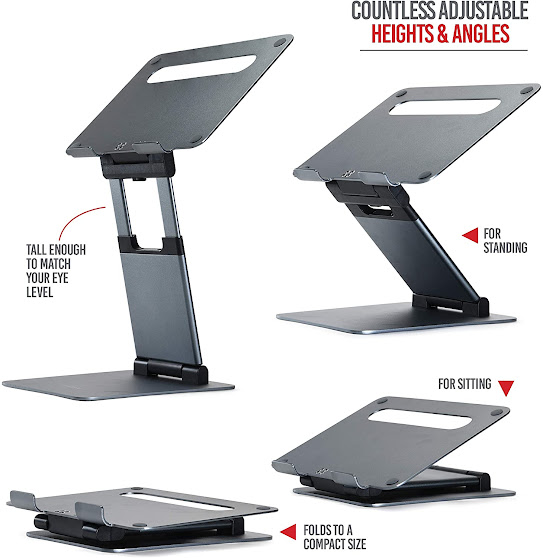
1. Lifelong Upryze Ergonomic Laptop Stand


Lifelong Upryze Ergonomic Laptop Stand  >> See product details


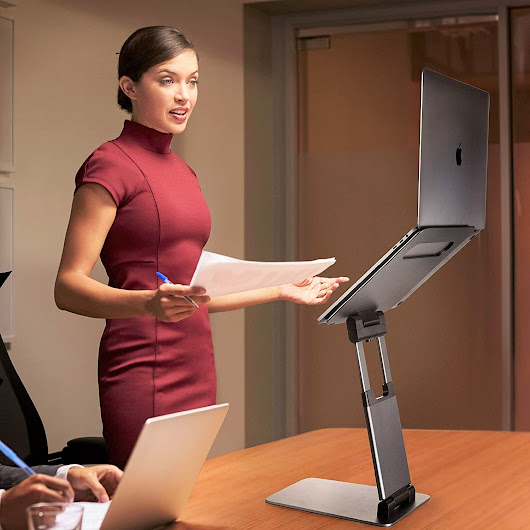
This ergonomic laptop stand is compatible for all MacBook and laptops of all sizes from 10 inch tablets to 17 inch laptops including MacBook Air, Pro, 10, 13, 15, 15.6 and 17 inch laptops. You can use it while sitting or standing. With it's cool design, it even keeps your laptop cool so that it doesn't overheat.


This Laptop stand standing desk can be used as a stand up desk, dj stand, podium stand, vertical laptop stand, laptop and desk riser, computer stand for laptop, adjustable laptop stand, portable desk, MacBook stand, Laptop holder, MacBook pro stand, adjustable standing desk, work from home workplace, laptop desk stand, desktop stand, uplift desk, notebook stand, laptop riser, portable laptop stand, laptop stand for desk, foldable computer desk, ergonomic stand & more.


I love this laptop stand, very flexible and adjustable. I do not have to sit every time I have to work on a laptop and a better posture as well. This Laptop stand was designed as an amazing adjustable computer stand that can easily be adjusted for any zoom conference meeting, watching videos, gaming or can even be used for cooking as a cookbook stand. it's just an amazing gifted notebook stand. 

The UPRYZE notebook stand was specially designed so that you don't have to use a standing desk in addition to your regular desk which will keep your office cluttered. Adjustable height and tilt so you can angle the laptop for maximum visual comfort, great for desk set up. 


2. Nexstand Laptop Stand


Nexstand Laptop Stand  >> See product details


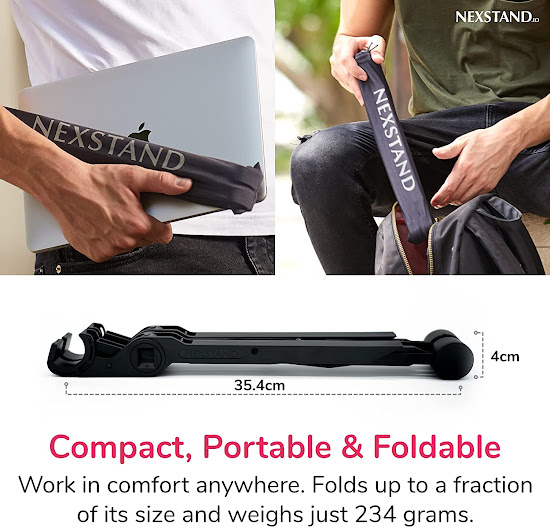
This strong laptop stand holds all weights of laptops and it features quality manufacturing where it counts. A compact and lighter design is also fully collapsible, making this laptop stand ideal for business travelers and corporate presentations.


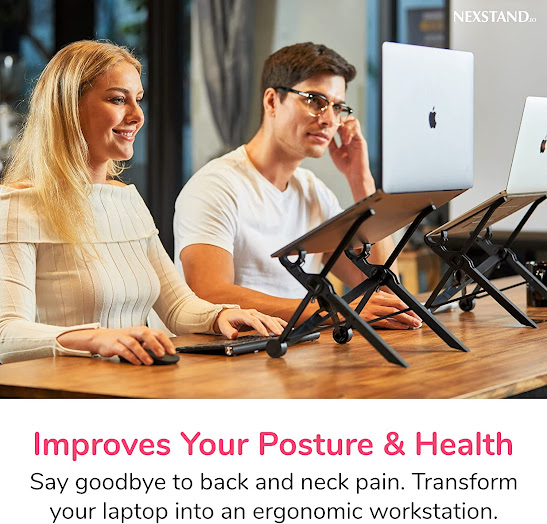
The Nexstand Laptop Stand is a portable and foldable MacBook stand and PC stand. Adjustable height settings and a universal fit make this ergonomic laptop stand the perfect stand for propping up almost all makes and models of laptops. Get anywhere from 5.5 inches to 12.6 inches of life for your Apple or PC laptop. 

The stand features 8 height adjustments to let you raise the screen height to your eye level for maximum comfort. Better ergonomics with this laptop stand mean you can sit in front of your laptop for longer. The stand is ideal for ASUS, HP, Samsung, Dell, Matebook, Surface, Lenovo, Acer, ThinkPad, and Apple MacBook laptops.  


The Nexstand Laptop Stand made with sturdy construction and a flexible design to fit almost all PC and MacBook models, this compact and folding adjustable laptop stand is perfect for computing on the go. Pack up the Roost in your backpack, briefcase or laptop bag and take it to the coffee shop, office or meeting. 

Unpack it and set it up with a portable Bluetooth mouse and keyboard, and adjust the height as needed, to give you to the ultimate ergonomic workstation on the go. Work and rest assured that your laptop isn’t going anywhere while you’re surfing the internet or doing business.

The Nexstand laptop stand is excellent, solidly built laptop stands that will hold your laptop steady. The Nexstand’s price represents excellent value and there’s nothing really negative about its quality, so if price is important to you, or you have a really large thick laptop, go with the Nexstand. 

Well, that's the best laptop stands according to my research and opinion. So quit hesitating about whether this is a worthy investment. It most certainly is, particularly if you spend hours a day at your laptop. Don't wait for your back and neck to start screaming at you. Thank you for reading, I hope it's useful. 


The Best Wireless Mouse in The US and UK

Generally I am a big fan of wireless devices. I love the increased mobility that a wireless keyboard and mouse gives you as well as the way it cuts down on the clutter around your PC. Wireless mice can be divided into 2 groups. Ones made for use with laptops or notebooks and those made for use with your PC. 

As most computer users know the track pads on a laptop are uncomfortable to use. The obvious solution is to use a compact mouse, which you can easily carry around with your laptop. When buying a mouse to use with your laptop, make sure that the USB wireless receiver is tiny. That way you can leave it in your laptop when you close it and pack the laptop into your bag. 

The problem with laptop mice is that they are small, so you tend to use them with your fingers. This causes your hand to become fatigued faster than with larger wireless PC mice. With PC mice you can rest the palm of your hand on the device causing your hand to take less strain over time.


What Should I Look For in a Wireless Mouse?

1. The Battery

Many first time wireless mouse buyers worry about the battery life of the mice they buy. Wireless mice aren't really that heavy on battery power. With a good one you can expect it to last for 3 to 9 months, before you have to replace the battery. With some of the high end models there is a light that starts to flash when it is running low on power. Some of the high end options can be plugged into a stand to recharge their batteries. There are also products that come with a USB cable. If your batteries start running low you can plug it in and use it like a cabled mouse until you can replace the batteries.


2. Brand

Logitech is the biggest brand in the wireless computer accessories market. Their products aren't always the best, but they have many different options and all of their products conform to a certain quality level. This means you can be assured that you are getting reasonably good value for the money you spend.

It should be clear at this point that buying a cheap wireless mouse isn't worth the frustration. I recommend getting a top end mouse from a reliable brand like Logitech.
 

3. Comfort

Choose a wireless mouse that can provide comfort in your hands.


The Best Wireless Mouse - Recommendation


After trying several wireless mouse, I feel that Logitech MX Master 3 is the best wireless mouse compared to similar products. The MX Master 3 has a bigger, ergonomic design that’s especially comfortable, as well as a second scroll wheel at the thumb, but it’s quite expensive.


The Best Bluetooth Wireless Mouse in The US and UK
Logitech MX Master 3 Advanced Wireless Mouse for PC  >> See product details


MX Master 3 for Mac is optimized for macOS, and iPad compatible. The most advanced Master Series mouse ever is finished in Space Gray to match perfectly with your iMac, Macbook Pro, or iPad Pro. Logitech MX Master 3 for Mac is the fastest, most precise, and most comfortable tool for digital creators. The electromagnetic MagSpeed scroll wheel is designed and manufactured in Switzerland, provides fastest, quietest, and most addictive scrolling experience ever. Rechargeable Li-Po (500 mAh) battery. Charging Time about 3 Hours.


The Best Wireless Mouse in The US and UK
Logitech MX Master 3 Advanced Wireless Mouse for Mac  >> See product details


The Best Wireless Mouse in The US and UK
The Best Wireless Mouse


This mouse has everything you need to be on the move. The shape fits my hand perfectly and it moves smoothly. The mouse is very comfortable to use and fits right for my hand. I have been using this mouse for 2 month and it works flawlessly. Just the right size for my hand. Not too tiny but not too chunky. Smooth wheel operation and works as it should. No glitches or skips while scrolling. 

Very convenient have the forward and backward buttons mounted to the side. It makes it faster to get work done. Plus, it's a good looking design with excellent finish that doesn't wear out and hides finger prints. I highly recommend this product, it's a high quality mouse. Durable, ergonomic, and responsive.


If you want a cheaper mouse, I recommend Microsoft Bluetooth Mobile Mouse 3600. The ambidextrous Mobile Mouse 3600 is comfortable for left- & right-handed use, but it’s smaller, it has fewer buttons, and it can connect to only a single device via Bluetooth.


The Best Wireless Mouse
Microsoft Bluetooth Mobile Mouse 3600  >> See product details


Ambidextrous design means you can use your mouse with your left or right hand, it’s comfortable either way. You'll appreciate how the Bluetooth Mobile Mouse 3600 comfortably fits your hand and your mobile lifestyle. Use it just about anywhere, even on a rough park bench or your living room carpet, relying on Microsoft BlueTrack Technology. Keep using your mouse for up to 1 year with a single battery, and rely on the power indicator to tell you when it's time to replace. 

Microsoft Bluetooth Mobile Mouse 3600 is very nice, affordable and feels comfortable. This mouse is compact and ideal for use with a laptop that has little space around it to work with. The mouse functioned properly upon first use, and paired very quickly with the laptop that I am using. It uses a single AA battery which is easily accessible by an easily removable tab on the under-surface. Highly recommend this product both for functionality and value.


Well, that's the best wireless mouse according to my research and opinion. Thank you for reading, I hope it's useful.


The best USB-C to DVI Cable and Adapter in The US and UK

First off DVI stands for Digital Visual Interface which supplies a high resolution/speed visual quality on your digital displays. When using the DVI cables you want to ensure that not only do you have the right type of cable, you have to make sure the socket is the right one instead because if you force the cable in, you might break one of the pins. Also you want to know exactly what you're using the DVI cable for, like which devices are you planning on connecting together and what are the possible ways of doing so.

When it comes to DVI cable you don't have to really stress over about the price on it because they are inexpensive. Mainly all digital devices already come with some type of port or socket and if they don't support the DVI cables than they have converters which cost a little more but there's always something available. I normally go online and search for what's out there and just compare and contrast what's the best as far as pricing and what are the possible two devices that I can connect together.

Many modern laptops use small, versatile USB-C ports to connect to everything from chargers to monitors to hard drives, but most monitors, TVs, and projectors still have only older, more common ports like DVI. I have found the best USB-C to DVI cable and adapter to help you use your new computer with the video display you prefer. 


The best USB-C to DVI Cable and USB-C to DVI Adapter


After trying several USB-C to DVI cable and adapter, I feel that Cable Matters USB C to DVI Cable and Adapter is the best compared to similar products.  


1. Cable Matters USB C to DVI Cable


The best USB-C to DVI Cable and Adapter
Cable Matters USB C to DVI Cable  >> See product details


The Cable Matters USB C to DVI Cable supports the newest release thin notebooks and smartphones with USB-C or Thunderbolt 3 to an HD display with DVI.


The best USB-C to DVI Cable in The US and UK
This cable supports up to 1920×1200 at 60 Hz, and there’s no need to buy a separate DVI cable.


This is a great cable at a great price, this cable is clearly a cut above most cables in quality. This is the fifth USB-C DVI cable that I have purchased. This cable has solid hard plastic at the USB-C connection, the hard plastic appears to prevent breaking the internal physical connection from the wire to the connector if it flexes whenever you move it. Great way to use an older DVI monitor with with my newer Mac with only Thunderbolt/USB-C ports. Plug and play, the display was recognized immediately and showed a perfect picture.  


2. Cable Matters USB C to DVI Adapter
The best USB-C to DVI Adapter in The US and UK
 Cable Matters USB C to DVI Adapter  >> See product details


This convenient single-link DVI adapter supports resolutions up to 1920×1200 at 60 Hz. This lightweight adapter weighs less than 1 ounce to travel easily in a laptop sleeve.


The best USB-C to DVI Adapter in The US and UK


The Cable Matters USB Type-C to DVI Adapter is specifically designed to connect newly released thin computers to existing monitors with DVI. Connect your computer to a monitor for an expanded workspace with this portable adapter and a DVI cable. 


This is a great adapter to plug my monitor into my laptop without the docking station. This allows me to extend my laptop screen onto an external monitor. This DVI to USB-C adapter fixed my issues with dual monitors and now I can run both without any issues. Much cheaper than having to buy a new monitor because of an outdated connection. I also like that it uses Type C to plug into the laptop because I often have go use the HDMI port for other equipment. Durable and affordable.

Well, that's the best USB-C to DVI cable and adapter according to my research and opinion. Thank you for reading, I hope it's useful.


The Best USB-C Fast Chargers for Android, iPhone, iPad and MacBook

Making the decision to buy a phone charger is something that can make you dizzy. The reason is, you may want to buy an good quality charger, but you are confused about which one to choose. So that you don't have to worry too much about choosing a device to charge your cellphone, here I have some recommendations for the best phone charger according to my research.

How to choose the best charger for your cellphone?

Before entering into product recommendations, I have some tips on buying a charger that you can consider:


1. Choose the charger with the best output

When you want to buy a phone charger, make sure you know how much power can be used to charge your cellphone. Thus, you can weigh how much output is needed to fully charge the phone. This is related to the many charger brands on the market that promise large output but are in fact slow in charging. Because the greater the output power that a charger has, it doesn't necessarily match your cellphone. Moreover, if your cellphone does not have fast charging facilities. For that, select the appropriate charger.


2. Choose a charger from a brand with a good reputation

Yes, this is very important to do when considering the many charger brands that are out there. You have to know which brands have been in the charging business for a long time, so that the reputation of the company can be seen. If you are careless in buying a charger for your cellphone, it could be that your cellphone will be damaged later. It could be that your battery performance will decrease or become bloated. So, choose a product from a trusted manufacturer.


3. Choose a charger with the required number of ports

You must determine how many ports will be needed in a charger. If you only need to charge for one device, choose the one port charger. However, if more than one item needs to be charged, choose a charger with multiple ports.


The Best USB Phone Charger


Here are some of the best cellphone chargers on the market:

1. Anker PowerPort III 65W Pod Lite
The Best USB-C Fast Chargers

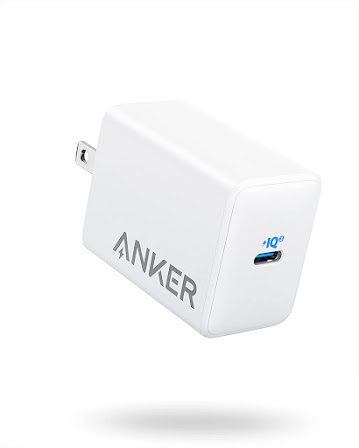
Anker PowerPort III 65W Pod Lite is a USB C Charger, PIQ 3.0 PPS Compact Fast Charger Adapter for MacBook Pro/MacBook Air, Samsung Galaxy S10/S20/S21, Samsung Galaxy Note 10/20, iPhone 11/12/13, iPad Pro, Google Pixel, Dell XPS 13 and More.


The Best USB-C Fast Chargers for Android, iPhone, iPad and MacBook
Anker USB-C Phone Charger


The Best USB-C Fast Chargers for Android, iPhone, iPad and MacBook
Anker USB-C Charger for MacBook Laptop  >> See product details


If you want the fast charger that’ll charge your phone at the fastest speeds, we recommend the single-port Anker PowerPort III 65W Pod Lite. That’s enough power to charge most phones, whether you have a MacBook, iPad, latest iPhone, a latest Samsung Galaxy S/Note model, a Google Pixel handset, or some other Android phone with fast charging feature more than halfway full in just 30 minutes.  

This charger is the best replacement from the regular charger. This charger also perfect for college students who bring their MacBook and iPad because this charger is small, attractive, inexpensive enough to have a couple lying around or in a bag and works perfectly. 


2.  Spigen PowerArc 40W ArcStation Pro USB C Wall Charger


If you want to get the fastest charge possible to two devices at once, The Spigen PowerArc 40W ArcStation Pro is the best of the few options available. When a single port is in use, it charges at up to 30 watts. When you use the two USB-C ports at the same time, both support full 20 Watt charging, so you can charge two phones at top speed, an iPhone’s battery will go from 0% to more than 50% charged in a half hour, whereas in the same amount of time on the charger the iPhone comes with, it would be at about 20%. This kind of dual–USB-C charger is still pretty rare, and the PowerArc 40W ArcStation Pro represents the best execution of it.

The Best Dual Port USB-C Fast Chargers for Android, iPhone, iPad and MacBook
Spigen PowerArc 40W ArcStation Pro USB C Wall Charger


Spigen USB C Wall Charger with 40W Dual USB C Charger, 30W Max Each Port, Foldable Fast Charger for iPhone 12/13, iPad Pro, MacBook, Samsung Galaxy S21, Samsung Galaxy Note 20, Google Pixel, and more.


The Best  USB-C Chargers
Spigen PowerArc 40W ArcStation Pro  >> See product details


By replacing Silicon semiconductor, every components in charger could be closer together. More power can be packed into a much smaller space. Gallium Nitride (GaN) Chip is capable of transmitting power 1,000 times more than chargers using Silicon. Thus, it's able to achieve faster charging with high efficiency. With Higher charging efficiency that other silicon charger, it intelligently controls the heat and charging output. Thus, it lasts longer and reduces damage to your device than other chargers.


Spigen PowerArc 40W ArcStation Pro is an excellent charger, the product is really well made, nice soft touch finish and strong LED light so you know what's going on with the charging ports. It is small, and importantly the prongs fold in. So it can be very easily stored in a bag. It also has two USB-C ports that will charge at 20w, making it perfect for charging an iPhone and an iPad.

Well, that's the best USB phone charger according to my research and opinion. Thank you for reading. I hope it's useful.


Shop related products:

The Best Budget Thunderbolt Docks in The US and UK

A high-quality Thunderbolt 3 dock is capable of exchanging data and rendering visuals at 4K or 5K display. With this hub, you can connect a bigger screen from your MacBook and witness a super-fast working experience. For your reference, we have created a list of best Thunderbolt 3 docks for MacBook. This top-rated Thunderbolt 3 hub fulfills users’ requirements of a superior charging dock for MacBook, which comes with a built-in Thunderbolt 3 port.


The Best Thunderbolt Docks


A Thunderbolt dock offers various inputs and outputs over a single cable and also charges your computer. After days of research and testing several Thunderbolt docks, I think CalDigit’s TS3 Plus is the best among them, offering more ports than other docks and excellent performance in a package that takes up little space on a desk.


The Best Thunderbolt Docks
CalDigit TS3 Plus Thunderbolt 3 Dock  >> See product details


The Best Thunderbolt Docks in The Market
>> CalDigit TS3 Plus


CalDigit TS3 Plus Thunderbolt 3 Dock - 87W Charging, 7X USB 3.1 Ports, USB-C Gen 2, DisplayPort, UHS-II SD Card Slot, Gigabit Ethernet for Mac & PC, Thunderbolt 4 Compatible (0.7m/2.3ft Cable)

With the TS3 Plus, a single Thunderbolt 3 port from your laptop expands to 15 ports. Power users need as many ports as they can get hold of and the TS3 Plus delivers on this promise. Whether you need multiple USB ports, dual 4K display connectivity, Digital Optical Audio out, or an SD Card Reader, the TS3 Plus packs everything into an incredibly compact unit. 

The CalDigit TS3 Plus is compact, yet provides plenty of room to access each port and feels solid. This is a great product that let you connect a 4K monitor. This dock has the most and the most useful ports, including USB-A and USB-C ports and an SD card slot. It can charge a 15-inch MacBook Pro at full speed or a 16-inch model at close to that. This CalDigit model has the best combination of ports, size, and shape I have found.

Well, that's the best Thunderbolt docks according to my research and opinion. Thank you for reading. May it be useful.


Shop related products:

The Best USB Hub and USB-C Hubs With Power Delivery in The US and UK

USB C Hubs


USB C is the latest port for computer hardware and their accessories, along with that it has plenty of critical additional benefits. With a USB C, you can combine all your connectivity, power output, and your input into one single lead. It will be helpful as it will reduce the number of the available ports in the latest computer and laptop models down from five to only two. 

USB C has been in the markets for quite some time now, and we have plenty of accessories out which are compatible with it, along with cables and adapters also. In this article, you will learn about some of the most useful and efficient USB C compatible accessories which you should surely have to get a better digital experience.

Hubs

These are efficient and practical pieces of equipment meant for those people who have a new laptop with latest connectors but still require power and use several of their older USB devices. USB C Hubs are simple, small and lightweight with three sockets. You can easily carry it along with the new laptop when you are on the go. Also, another added advantage is that you get to plug these hubs directly into your computer without having to require another separate adapter.

Docking stations

Docking stations are essential devices whose requirement can be felt when you have to get back to your office. Docking stations have multiple numbers of sockets which make it easily possible for you to connect your laptop with other peripheral devices, for instance, a full-sized keyboard or even a large display monitor. Besides, including a type C ports, these adapters are also able to include Ethernet connections with various USB 3 ports. 

These come in handy when you have to give presentations in high-quality displays or similar other uses. Docking stations include outputs which can even provide high-quality HDMI resolutions. Besides these, they also have audio jacks and slots for SD cards.

Thumb Drive

At least, till the time comes when all manufactures finally decide to offer us one port which is the standard for all devices, it will be highly beneficial for us to use one thumb drive which can connect with both standard plugs and USB C plugs. These thumb drives are for a dual purpose, and they have two built-in plugs. Thus you will be able to fit the correct socket with the type of port which will match that type along with the proper speed. This can either be USB A or a USB C.

USB C has better connectivity and offers faster speed. MacBooks and all new laptops are equipped with USB C ports. You can easily get the accessories mentioned above to get the most out of your laptop. 
 

The Best USB / USB-C Hubs


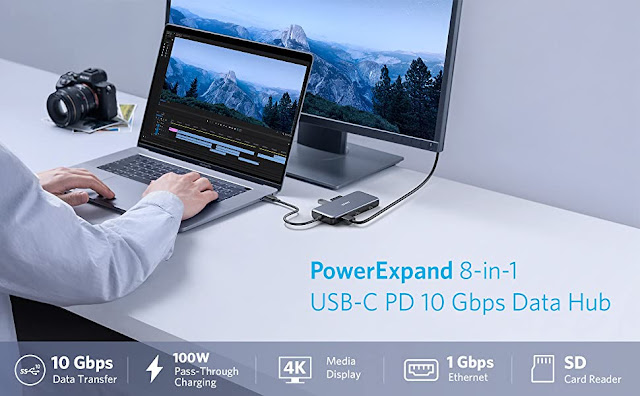
If you want to plug in anything with a connection other than a USB-C cable, the most efficient option is a USB-C hub, which provides multiple types of ports in a relatively compact package. One of my favorite hub is Anker’s Power Expand 8-in-1 USB-C PD 10 Gbps Data Hub. 

In addition to having all the right ports, it’s one of the very few hubs with an HDMI port that supports a proper 60 Hz refresh rate on 4K monitors so that animations and movements on screen are nice and smooth, almost every other hub maxes out at 30 Hz, which results in a frustratingly laggy experience.


The Best USB-C Hubs
Anker PowerExpand 8-in-1 USB-C PD 10Gbps Data Hub


Ports and features:
  • Two USB-A 3.2 Gen 2
  • One USB-C 3.2 Gen 2
  • One USB-C PD port
  • SD card slot
  • One HDMI
  • 85-watt charging pass-through
  • Ethernet
  • microSD card slot


The Best USB and USB-C Hubs With Power Delivery in The US and UK
Anker USB C Hub 


The Best USB and USB-C Hubs
Anker PowerExpand 8-in-1 USB-C PD 10Gbps Data Hub  >> See product details


This USB Hub offers the connectors most people need most of the time, and in our tests they worked just as well as expected. This hub is powerful enough to leave at your desk full-time as a docking station but small enough to slip into a laptop bag and use on the go. 

The Anker USB C Hub is a very good product. This hub is a versatile add on for any Mac that does not have the traditional ports. I use it with my MacBook laptop to connect it to my home Ethernet network, access camera memory cards and continue using my high capacity HHDs that don’t have type C connectors. 

Well, that's the best USB hub according to my research and opinion. Thank you for reading. May it be useful.


Shop related products:

Share with your followers: